





Cloud Storage App vs File Manager App: Which Is Safer for Your Data on Android?


With smartphones storing everything from personal photos to important documents, data security on Android phones has become a serious concern. Most users rely on a file manager app to manage files, but is that really the safest option?
Today, more users are switching to a cloud storage app for Android to protect their data, free up phone storage, and gain better privacy control. This article compares file manager apps vs cloud storage apps and explains why cloud storage is now considered the safer and smarter choice.
What Is a File Manager App on Android?
A file manager app allows you to browse, move, delete, and rename files stored on your phone’s internal memory or SD card. While it’s useful for basic file access, it offers no advanced data protection.
Limitations of file manager apps:- No encryption or passcode protection.
- Files are exposed if someone accesses your phone.
- Storage limited to your device.
What Is a Cloud Storage App?
A cloud storage app stores your files securely online instead of only on your phone. This makes it easier to:- Protect files from data loss.
- Access files anytime.
- Free up internal storage.
Modern users now prefer secure cloud storage apps that combine storage, privacy, and accessibility.
Cloud Storage vs File Manager: Full Comparison
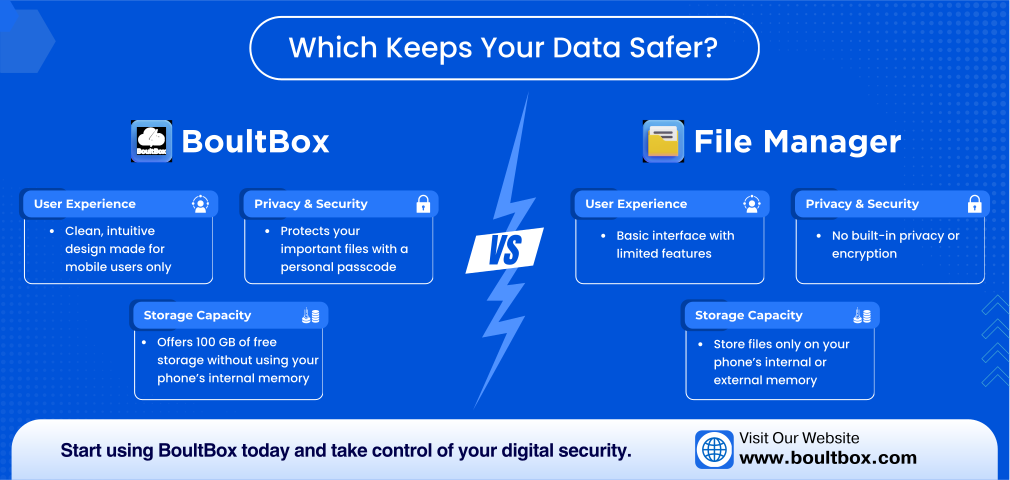
| Feature | File Manager App | Cloud Storage App (BoultBox) |
|---|---|---|
| Storage Space | Limited to phone | 100GB free cloud storage |
| Data Security | ❌ No protection | ✅ Passcode-protected files |
| Phone Lost Protection | ❌ Files lost | ✅ Files stay safe |
| Privacy Control | ❌ Anyone can access | ✅ User-controlled access |
| File Organization | Basic | Smart folders |
| Android Optimization | Basic | Mobile-first |
1. Storage Space: Phone Memory vs Free Cloud Storage
File Manager Apps:- Uses phone storage only.
- Storage fills quickly.
- Forces deletion of files.
- Offers free cloud storage for Android users.
- Keeps large files off your phone.
- Ideal for photos, videos, and documents.
Winner: Cloud storage app more space, no compromise.
2. Data Security & Privacy on Android
File Manager Apps:- No file lock or encryption.
- Anyone with phone access can open files.
- Not safe for private documents.
- Passcode-protected access.
- Private photos and files stay hidden.
- Full user control.
Winner: Cloud storage app built for data security.
3. Data Backup & File Safety
File Manager Apps:- Files stored locally only.
- Phone damage or reset = data loss.
- Files backed up securely.
- Safe even if phone is lost or stolen.
Winner: Cloud storage safer long-term storage.
4. Best File Organization Experience
File Manager Apps:- Designed only for browsing.
- Difficult to manage large data.
- Clean, easy-to-use interface.
- Organized folders for work & personal files.
Winner: Cloud storage app better user experience.
5. Best Cloud Storage App for Android Users
If you want free cloud storage, strong privacy, and simple file management, BoultBox is designed exactly for Android users.
Why BoultBox stands out:- 100GB free cloud storage.
- Secure passcode protection.
- Mobile-first Android experience.
- Ideal alternative to file manager apps.
Final Verdict: File Manager or Cloud Storage?
A file manager app is fine for basic file browsing. But when it comes to:- Data security.
- Privacy protection.
- Free cloud storage.
- Android file backup.
A cloud storage app is clearly the better and safer option.
If you’re searching for the best cloud storage app for Android, BoultBox offers storage, security, and peace of mind in one place.
Start Using Secure Cloud Storage Today
Visit:FAQs – High-Intent Search Queries
Is cloud storage safer than file manager apps on Android?
Yes, cloud storage apps provide better security, privacy, and backup.
Which is the best cloud storage app for Android?
Apps offering free storage, security, and mobile optimization are preferred.
Can cloud storage replace file manager apps?
For storage, privacy, and backups yes. File managers are only for local browsing.
Does free cloud storage really protect data?
Yes, when combined with passcode protection and secure access.
Leave a Reply
Your email address will not be published. Required fields are marked *
Related Posts
Your Pocket-Sized Cloud – Why Boult Box Is Your Ultimate Mobile Data Companion
17/06/2025 · 5 Comments
In a digitally mobile world where smartphones are at the center of both work and personal lives, access to reliable cloud storage is no longer optional—it’s essential. Boult Box is built
100GB Free Cloud Storage in 2026: Why BoultBox Is a Smart Choice
17/06/2025 · 5 Comments
In 2025, cloud storage is no longer a luxury—it’s a necessity. Whether you're a student, a remote professional, a content creator, or just someone who needs digital peace of mind, cloud storage is as vital as having an internet connection.
Secure Cloud Storage in 2026: Inside BoultBox Premium Vault Security
17/06/2025 · 5 Comments
In 2025, the digital landscape is more complex and vulnerable than ever before. Data breaches are no longer rare events; they have become daily headlines. From personal identity theft to corporate espionage, the threat to our digital information is real and growing. In this era of hyperconnectivity and mass surveillance, digital privacy isn’t a luxury – it’s a necessity.
BoultBox Premium: Redefining What Cloud Storage Can Be in 2025
1/07/2025 · 5 Comments
In an age where free cloud storage options are everywhere, you might wonder: Why go premium? The answer lies not in how much you pay, but in what you truly get.